Keep up-to-date with us and what's happening in the business world |
|
|
|
- Changes to KiwiSaver: How to Comply With the New Rules - Important Notices - Xero Small Business Insights: What the Latest Data Means for You
- Xero Tip of the Month: Faster Bill Management With Quick View - Welcome to the Team: Abel
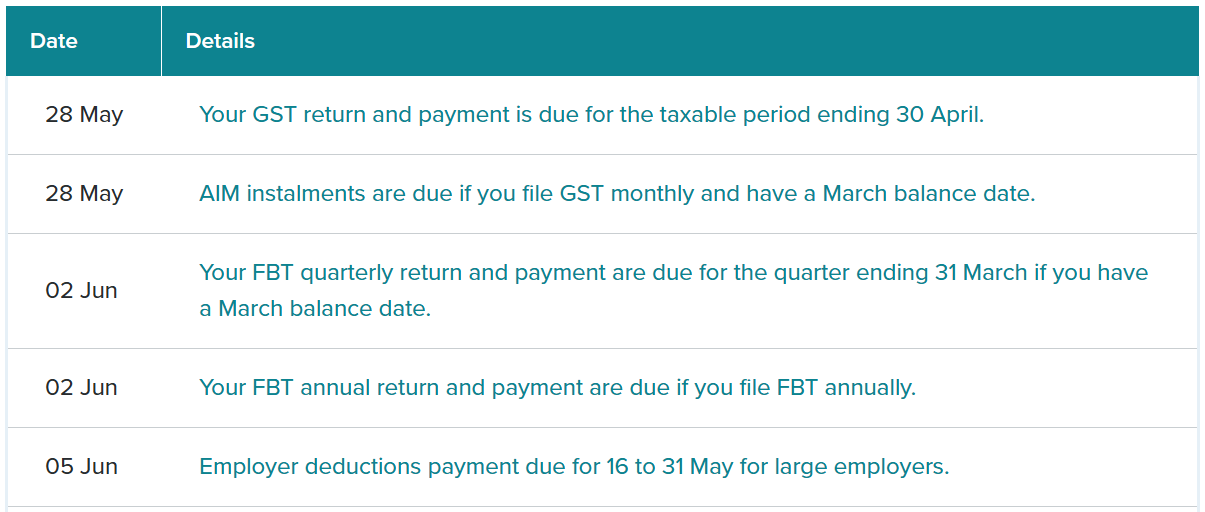
- Tax Question of the Month: Side Business Income and the Automated Tax Assessment - IRD Upcoming Tax Payment Dates |
|
|
|
Major changes to KiwiSaver were announced in Budget 2025. Some of these changes have now come into effect, so it’s important to check that you’re complying with the new rules.
Let’s look at what KiwiSaver is and the impact of the recently changed rules. What is KiwiSaver? The KiwiSaver voluntary savings scheme is aimed at helping New Zealand workers save for retirement or buy a first house. But with the rising cost of living, action was needed to make KiwiSaver fit for purpose and more fiscally sustainable as a savings scheme. Changes to the KiwiSaver rules
How will the changes to KiwiSaver affect your employees and your small business? Here’s a brief rundown of the changes that are already in effect, those that came into effect in April 2026 and those that will hit in April 2028.
Legislation that’s already in effect: - If an employee is aged 16 or 17, they qualify for government contributions, so long as they meet other eligibility requirements.
-
From 1 July 2025, the government will contribute 25 cents for each dollar your employee contributes to KiwiSaver each year, with the maximum government contribution being $260.72.
- If they earn more than $180,000 of taxable income a year, your employee does not qualify for the government contribution.
Legislation that came into effect in April 2026: For employees: -
If an employee is contributing at the default rate of 3%, this will automatically rise to 3.5% for both the employee’s contribution and your employer’s contribution.
- As an employer, you will deduct 3.5% from 1 April (unless your employee applies for a temporary rate reduction).
-
The new rate will affect all pay days from 1 April. So even if your employee’s pay period covers before and after 1 April, the whole contribution for that pay period will be deducted at the new rate.
- If an employee is contributing more than 3% already, their contributions will not change. However, if your contribution as an employer is 3%, this will rise to 3.5%.
For employees aged 16 or 17: - Younger employees will qualify for employer KiwiSaver contributions of 3.5% of their pay from 1 April 2026, so long as they meet other eligibility requirements.
-
If an employee is an existing KiwiSaver member, as their employer, you will start making contributions automatically. The employee doesn’t need to do anything.
Temporary rate reduction: -
A temporary rate reduction is available for people who want to carry on contributing at 3% from 1 April 2026.
- Employees can apply for a temporary rate reduction for between 3 and 12 months. Their contributions will be reset to the default rate after 12 months. They can apply for the rate reduction as many times as they like.
-
As their employer, you can choose to match their temporary rate reduction. Once they move from the temporary rate to a higher rate, as their employer, you’ll be notified.
If you’re an employer: You will need to: - Ensure your payroll settings are updated to apply the default employee and employer contribution rates of 3.5%.
-
Make employer contributions for your 16- and 17-year-old employees who are existing KiwiSaver members or join through a provider.
- Process any temporary rate reduction letters your employees give you.
Legislation that will come into effect in April 2028: From April 2028, the default KiwiSaver contribution rate will rise again to 4% (from 3.5%) for you and your employees. Helping you comply with the KiwiSaver changes:
These amendments to KiwiSaver could have a significant impact for your small business. Increased employer contributions will increase your payroll costs and stretch your cashflow, as will making contributions for younger workers in the 16 to 17-year-old age bracket. It’s important for your payroll software and processes to be updated, ensuring that you’re making the correct contributions for the right people, at the right rates. Come and talk to the team about complying with the KiwiSaver changes. |
|
|
|
Upcoming Government Budget - 28 May 2026
The Government’s 2026 Budget will be delivered on Thursday, 28 May 2026, and is expected to outline the next phase of fiscal priorities, spending decisions, and any tax or policy changes affecting individuals, businesses, and the wider economy.
We will be reviewing the Budget in detail once it is released and will provide a clear summary of the key impacts for our clients shortly afterwards, including what actions (if any) you may need to consider. Keep an eye out for our General Ledger - Budget Special for a full breakdown. |
XERO SMALL BUSINESS INSIGHTS: WHAT THE LATEST DATA MEANS FOR YOU |
|
|
New data from Xero’s Small Business Insights shows that despite rising fuel costs, small business sales have remained steady. Sales levels have held up across many sectors, even with higher input costs flowing through the economy. But there are a few pressures worth noting: - Fuel and transport costs remain high
-
Profit margins are tightening for many businesses
- The full impact of these cost increases is still working its way through
|
| |
|
While many businesses continue to trade well, the financial “buffer” between stable and strained is becoming smaller. That’s why now is a good time to stay proactive with your numbers, rather than reacting when pressure shows up. Simple steps like keeping a close eye on cash flow, reviewing pricing, managing debtors, and planning ahead for tax and larger expenses can make a real difference.
If you’d like help understanding where your business sits, or want clarity on what the next 6–12 months might look like, our team is here to support you. From cash flow analysis to management reporting, we can help you stay on top of the numbers and make confident decisions ahead of time. |
|
|
|
XERO TIP OF THE MONTH: FASTER BILL MANAGEMENT WITH QUICK VIEW |
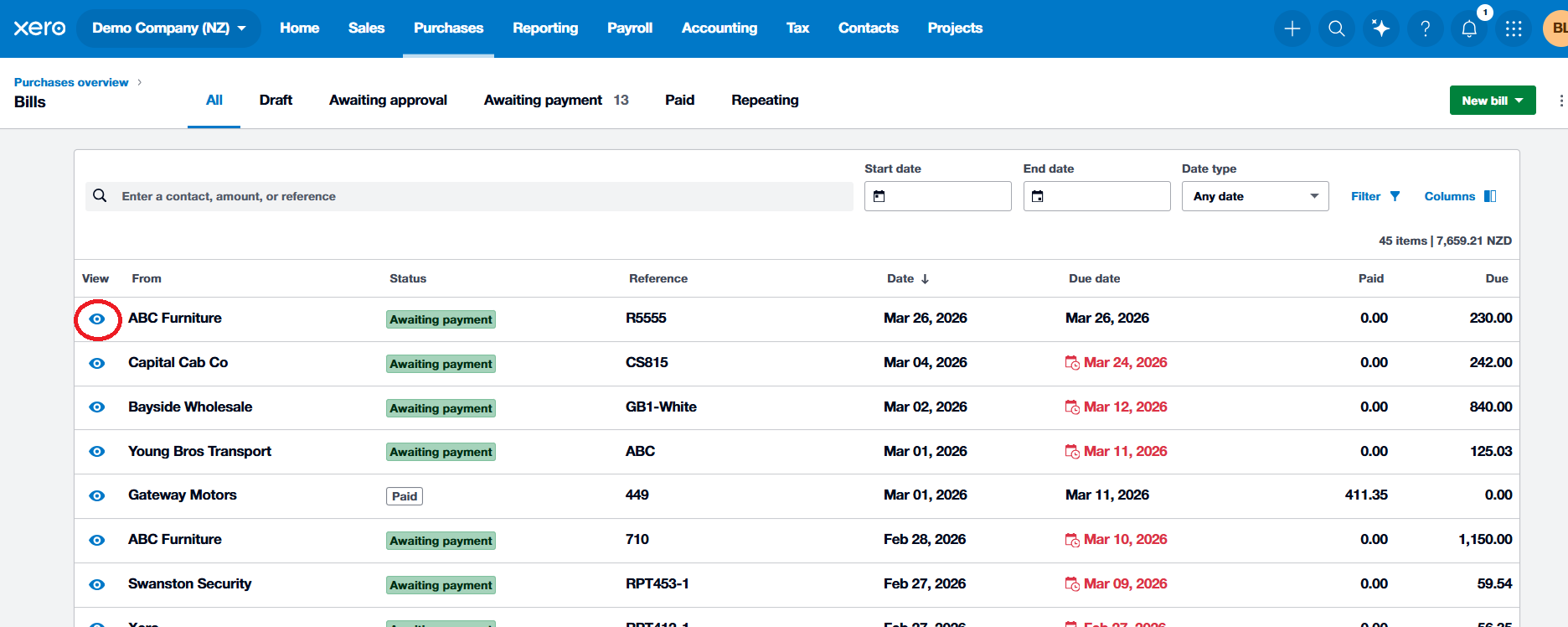
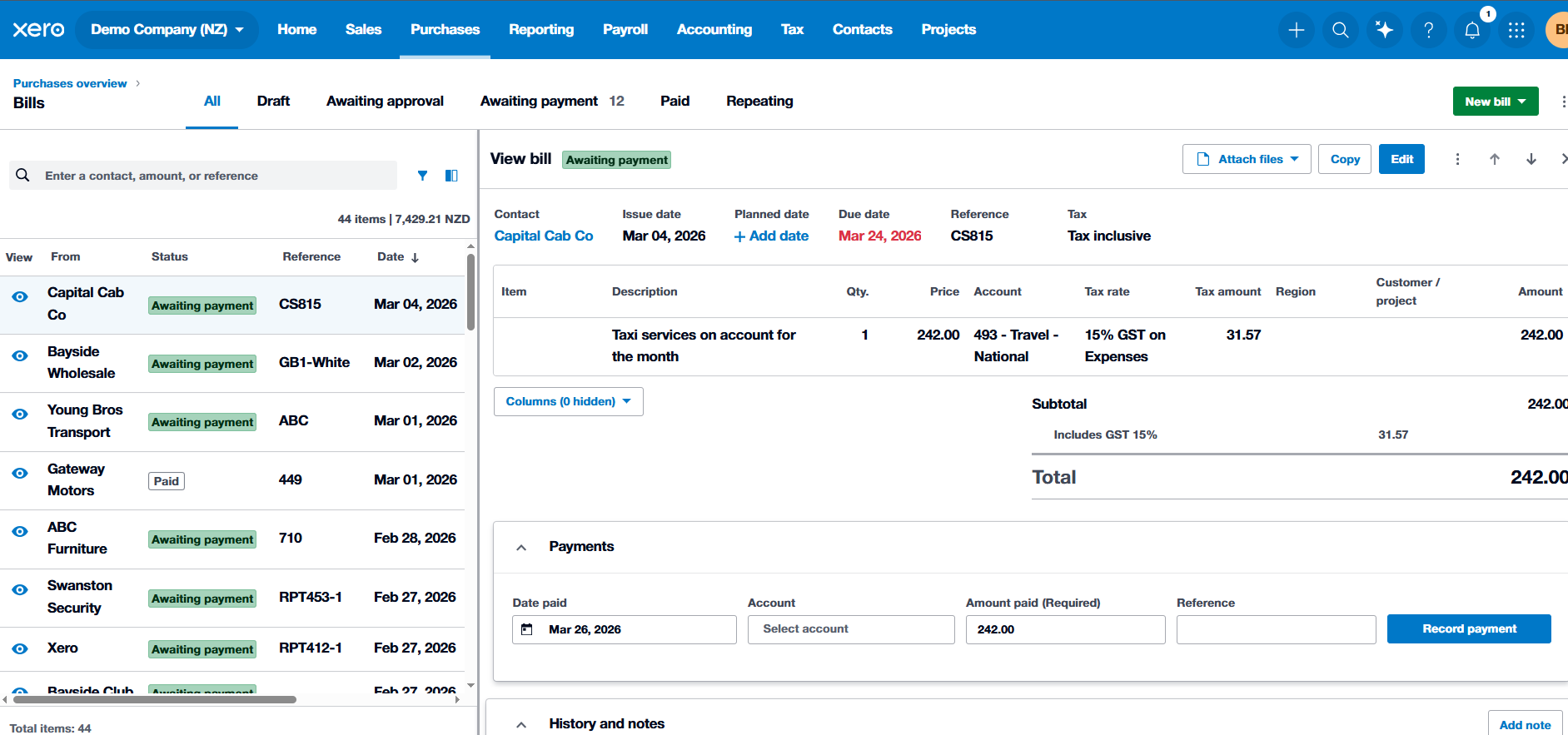
Say goodbye to tab-jumping and constant back-button clicking. Xero’s Quick View panel is here to make bill management significantly faster. With split-screen editing, you can now review, edit, and approve bills without ever losing sight of your main list. How to Use Quick View for Bills: 1. Under Purchases, select Bills 2. Click the View (eye) icon next to any bill to slide open the split-screen panel. 3. Within the Quick View panel, you can: -
Approve bills quickly with Approve & Next or arrow buttons
- Edit bill details and line items instantly
- Check attachments - View the source invoice alongside the data entry.
-
Update supplier info or adjust payment dates
- Resize the panel or show/hide columns to suit your workflow
Next time you’re working through your payables, use Quick View to speed up your workflow and complete your bill processing in record time. |
|
|
WELCOME TO THE TEAM: ABEL |
|
|
|
|
Meet Abel, the newest member of the AAF team. He joins us with a strong background in accounting, auditing, and business advisory, and looks forward to providing clients with practical, tailored advice.
Originally from Kenya, Abel has experience across both public sector finance and client-focused roles. Before moving to New Zealand, he worked in a range of accounting and audit positions, contributing to improvements in governance, transparency, and financial accountability across different organisations. |
|
|
|
Abel holds a Master of Professional Accountancy from Massey University and is a Certified Public Accountant. He enjoys helping clients make sense of their financial information and turning complex numbers into clear, practical insights that support confident decision-making.
Outside of work, Abel enjoys football and is a passionate Arsenal FC supporter. He also has a keen interest in farming and sustainable agriculture. Welcome, Abel! |
TAX QUESTION OF THE MONTH: |
QUESTION:
Aroha works full-time as a salaried employee. In October 2025, she started a small online business selling custom art prints. What began as a hobby has grown, and by the end of the tax year on 31 March 2026, she had generated $5,000 in sales. She also incurred $1,500 in costs for materials, website fees, and postage. In mid-May 2026, Aroha receives an income tax assessment from Inland Revenue based on the PAYE information from her employer. The assessment shows she is due a small refund. Aroha assumes this is her final tax position for the year and that she does not need to do anything further. What are Aroha's tax obligations regarding her online art business, and what action, if any, should she take in response to the automated assessment? |
ANSWER: Analysis and Solution
1. Is the Art Sale Activity a Business? (Income Tax Act 2007, section CB 1)
The first step is to determine if Aroha's online sales constitute a "business" for tax purposes. An activity is more likely to be considered a business, rather than a hobby, if there is an intention to make a profit and the activities are conducted in a commercial manner.
Given that Aroha has established an online presence, is making regular sales, and is incurring expenses to support this activity, it is highly likely her art sales have crossed the threshold from a hobby to a taxable business.
Therefore, the income she derives from this business is assessable income under section CB 1 of the Income Tax Act 2007.
2. The Automated Assessment and Obligation to Correct (Tax Administration Act 1994, section 22G)
Inland Revenue's automated assessment system is based on the information it holds, which for many individuals is solely their salary and wage data ("reportable income"). -
Qualifying Individual: Initially, Inland Revenue treated Aroha as a "qualifying individual" because it only had information about her salary. A qualifying individual is generally not required to provide any income information, and their tax position is finalised automatically.
-
"Other Income": However, Aroha's business income is classified as "other income". This means she is not a "qualifying individual" and has an obligation to provide this information to Inland Revenue.
-
Correction of Information: Aroha must correct the information in her tax account. Section 22G of the Tax Administration Act 1994 allows an individual treated as a qualifying individual to amend the income information in their final account at any time before their terminal tax date (usually 7 February of the following year). When this is done, the initial assessment is regarded as not having been made.
Relying on the automated assessment would result in her under-reporting her income and underpaying her tax.
3. Calculating Net Business Income (Income Tax Act 2007, section DA 1)
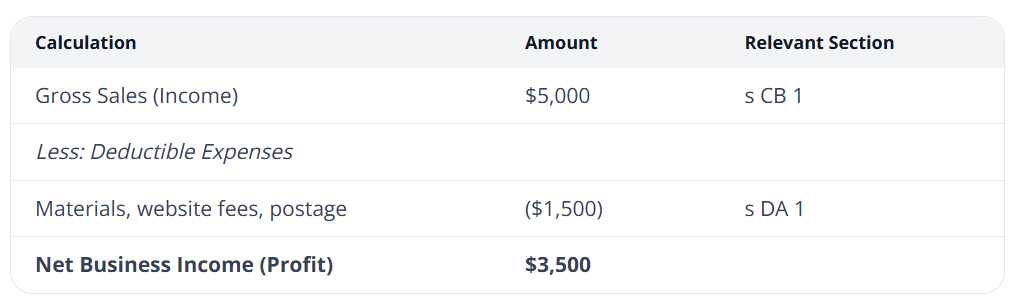
Aroha is required to pay tax on the net profit from her business. She is allowed to claim deductions for expenses incurred in the course of carrying on that business. |
This net income of $3,500 must be added to her salary income to determine her total taxable income for the year.
4. Practical Steps for Aroha - Compile Records: Gather all invoices for her sales and receipts for her business expenses for the period 1 April 2025 to 31 March 2026.
-
Calculate Net Profit: Calculate the final profit figure as shown in the table above.
-
Update Inland Revenue: Log in to her myIR account and amend her income tax information. She will need to add her self-employed business income and claim the corresponding expenses. This will override the incorrect assessment that was automatically issued.
-
Pay Tax: After submitting the corrected information, Inland Revenue will issue a new assessment. Aroha will need to pay the tax owing on her business profit by the due date.
Client Takeaway
The automated tax assessment system simplifies tax for many, but it is not infallible. It is crucial for clients to understand that the legal responsibility for ensuring their tax assessment is correct remains with them. If a client's circumstances change or they start earning income from other sources (like a side business), they must proactively update their information with Inland Revenue rather than relying on the pre-populated assessment.
For further certainty on what constitutes income and allowable deductions, you can refer to Parts C and D of the Income Tax Act 2007. |
References
Income Tax Act 2007, s CB 1
Special report on simplifying tax administration - individuals' income tax v2 Latest at 5 Special report on simplifying tax administration - individuals' income tax v1 at 5
Special report on simplifying tax administration - individuals' income tax v2 Latest at 6 Special report on simplifying tax administration - individuals' income tax v1 at 6
Special report on simplifying tax administration - individuals' income tax v2 Latest at 8 Special report on simplifying tax administration - individuals' income tax v1 at 8
Tax Administration Act 1994, s 3 definition of "qualifying individual" Special report on simplifying tax administration - individuals' income tax v2 Latest at 35
Special report on simplifying tax administration - individuals' income tax v1 at 35 Tax Administration Act 1994, s 22G SPS 20/03: Requests to amend assessments at 31 |
|
|
IRD UPCOMING TAX PAYMENT DATES |
|
|
|
|