Keep up-to-date with us and what's happening in the business world |
|
|
|
- What’s Taking More Time Than It Should in Your Business? - Important Notices - Buying a Business Asset? Here’s What We Need - Xero Tip of the Month: Use Reference Fields Consistently for Easier Searching
- Tax Question of the Month: When Should the Insurance Payout be Recognised as Taxable Income? - IRD Upcoming Tax Payment Dates |
|
|
|
A missing receipt. An invoice entered twice. A payment waiting for approval. Individually, these might seem like small frustrations, but when they happen regularly, they take time away from running your business.
This October, take a look at the everyday tasks that feel harder than they need to be. A few practical changes could save time, reduce errors and make life easier for you and your team. |
|
|
|
|
Searching for receipts and supplier invoices: If paperwork is spread across inboxes, folders and someone’s glovebox, finding what’s needed can become a time-consuming hunt.
Agree on one place for receipts and invoices to go, using the process we have set up with you. Submitting documents as they arrive helps keep your records current and reduces the need to chase missing information later. | |
|
|
|
Entering the same information more than once: Are you maintaining a spreadsheet alongside Xero, or copying the same information between different systems? Some records serve a separate purpose, but others may duplicate information you already have. Before spending more time updating them, consider whether they are still needed. If you’re unsure, ask us - there may be a simpler way to get the information you use.
|
|
|
|
|
Following up unpaid invoices: When you’re busy running your business, following up unpaid invoices can easily slip down the list. Delays can put pressure on cash flow and make overdue payments harder to recover. Set aside a regular time to review outstanding customer invoices, follow up overdue amounts and resolve any queries. Clear payment instructions and a consistent approach can help keep payments coming in.
|
|
|
|
|
Waiting for approvals or answers: Bills and routine tasks can stall when it isn’t clear who is responsible, or when everything depends on one person being available. Make sure your team knows who approves payments, who answers accounting queries and who provides cover during leave. When we request information from you, a clear point of contact also helps us keep things moving.
|
|
|
|
Start with one thing
You don’t need to overhaul your business. Ask yourself - or your team - which recurring task causes the most frustration, then choose one improvement to try this month. If your financial administration is taking more time than it should, talk to the All Accounted For team. We can help you review your processes, make better use of Xero and identify practical ways to make managing your accounts easier.
|
GST & Provisional Tax Reminder:
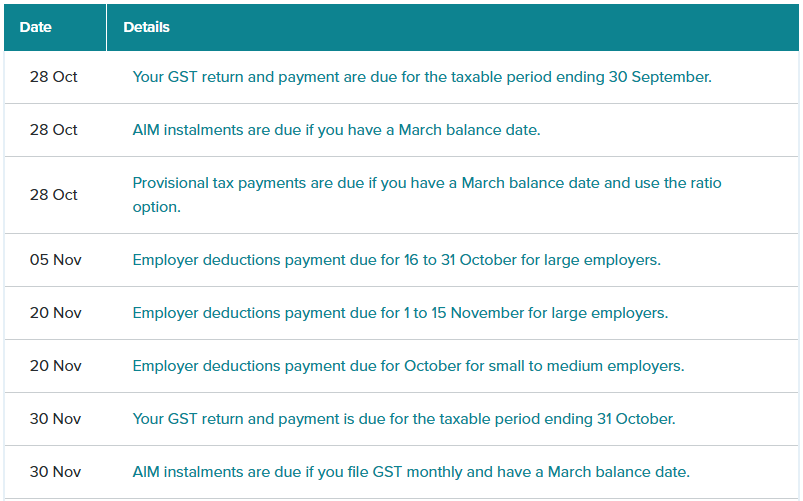
GST returns and payments for taxable periods ending 30 September 2026 are due on 28 October 2026. For clients who file GST six-monthly, provisional tax payments are also due on this date. Please refer to your payment reminder for your specific amount and due date.
We know upcoming tax payments can put pressure on cash flow. If you’re concerned about making a payment, please get in touch before the due date. We can talk through your circumstances and help you explore the options available, including whether an Inland Revenue instalment arrangement may be appropriate. For provisional tax, we can also discuss options through Tax Management New Zealand (TMNZ). TMNZ’s tax pooling service may allow you to pay in instalments or defer payment to a later date, with interest costs applying. This could give you some breathing room while managing your cash flow. This option applies to provisional tax only and cannot be used for your upcoming GST payment. FamilyBoost: July - September Claims Now Open If you have children attending early childhood education (ECE), you may be eligible for FamilyBoost to help with the cost of childcare.
Claims for the quarter ended 30 September 2026 are now open. Eligible households can submit their claim through myIR once they have registered for FamilyBoost and gathered the required ECE invoices or statements.
For eligibility details and instructions on how to claim, visit Inland Revenue’s FamilyBoost page by clicking the button below. |
|
|
BUYING A BUSINESS ASSET? HERE’S WHAT WE NEED |
Whether you’re replacing a laptop, buying a work vehicle or investing in machinery, a few extra details help us record the purchase correctly and assess the tax deductions available.
When you purchase a business asset, please make sure we have: |
|
| |
|
- The purchase invoice: Keep the full invoice showing what you bought, the purchase date and the cost.
-
Any finance agreement: Send us the agreement so we can correctly record the borrowing, repayments and interest.
- When it became available for use: Let us know when the asset was ready and available to use in your business, particularly if it required delivery, installation or construction.
-
Details of any private use: Tell us if the asset will also be used personally, so we can assess the business portion.
- Details of any sale or trade-in: If you replaced an existing asset, provide the sale or trade-in documentation too.
If you’ve already uploaded the invoice through your usual process, there’s no need to send it again - just let us know any additional details.
Could Investment Boost apply?
Eligible new or new-to-New Zealand business assets may qualify for Investment Boost - a deduction of 20% of the eligible cost upfront, followed by depreciation on the remaining 80%. Conditions apply, and second-hand assets sourced within New Zealand do not qualify. This is a deduction from taxable income, rather than a refund of 20% of the purchase price. If you’re planning a significant purchase, talk to the All Accounted For team before committing. We can help you understand the tax treatment and consider how the purchase fits your cash flow and business plans. |
XERO TIP OF THE MONTH: USE REFERENCE FIELDS CONSISTENTLY FOR EASIER SEARCHING |
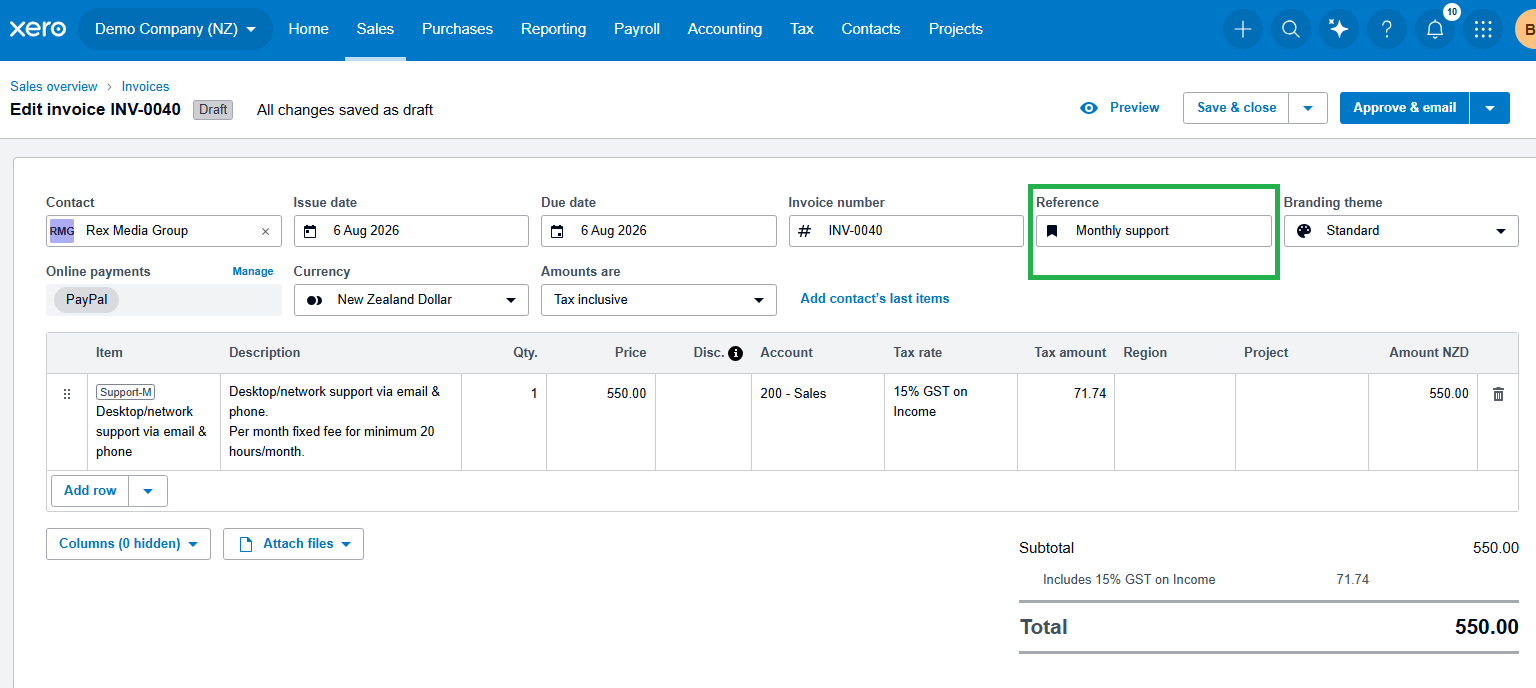
A simple but highly effective habit in Xero is consistently using the Reference field when entering invoices, bills or bank transactions. While it's often overlooked, it can make a big difference when it comes to finding and identifying transactions later on. For businesses managing multiple customers, suppliers, projects or recurring expenses, using consistent references makes transactions much easier to track and search.
How to use the Reference field in Xero: 1. When creating an invoice or bill, locate the Reference field 2. Enter a clear and consistent description, such as: - “Website Hosting - August 2026”
-
“Office Supplies - July 2026”
- “Project - Smith Renovation”
-
“Vehicle Registration - ABC123”
3. Save or approve the transaction as normal
4. Use the search bar later in Xero to find transactions by reference
Using consistent references makes it much easier to locate specific transactions quickly, especially when reviewing reports, answering customer or supplier queries, or checking previous purchases. It also helps keep your records organised and can save valuable time as your business grows. |
|
|
TAX QUESTION OF THE MONTH: |
QUESTION:
A tradesman carrying out routine maintenance on a rental property owned by a company accidentally left a tap running, causing flooding and substantial damage. The property was insured, and the insurer paid out $22,500 on 21 November 2025.
As at 31 March 2026, repairs to the water-damaged property had not yet started, and the company's 2026 accounts are now being prepared.
Does the $22,500 insurance payout need to be included as taxable income for the year ended 31 March 2026? |
ANSWER:
Based on the circumstances above, the $22,500 insurance payout should not be included as taxable income for the 2026 income year, provided the payment relates solely to the cost of repairing the water damage and no repair costs had been incurred by 31 March 2026. Under section CG 4 of the Income Tax Act 2007, an insurance payment that reimburses deductible expenditure is generally treated as income. However, the timing of when that income is recognised depends on when the related expenditure is incurred.
In this case, although the insurance payout was received on 21 November 2025, the repair work had not started and no repair costs had been incurred by 31 March 2026.
This means there was no amount to recognise as taxable income under section CG 4 for the 2026 income year. Instead, the insurance proceeds would generally be recognised for tax purposes in the income year, or years, in which the related deductible repair costs are incurred. In simple terms: receiving the insurance payout does not necessarily mean it becomes taxable income straight away. Where the payment reimburses deductible repair costs, the timing of the taxable income is linked to when those repair costs are actually incurred.
References Income Tax Act 2007 – s CG 4 |
|
|
IRD UPCOMING TAX PAYMENT DATES |
|
|
|
|